Hermes Agent is the AI agent everyone on X is talking about this week. It is free, open source, and it remembers what you teach it.
But “free” comes with fine print. In this guide you will learn what Hermes Agent is, what it really costs, and how to set it up on Windows in about 15 minutes.
Quick answer: Hermes Agent is a free, open-source (MIT) AI agent from Nous Research. It runs on your computer or a server, keeps a long-term memory, writes its own skills, and talks to you in the terminal, a desktop app, or Telegram, Discord and WhatsApp. The agent costs $0. You only pay for the AI model behind it, and even that can be free.
In this article
What is Hermes Agent?
Hermes Agent is an open-source AI agent built by Nous Research, the lab behind the Hermes family of open models. Its slogan is “the agent that grows with you”, and that sums up the idea.
A normal chatbot forgets you when the chat ends. Hermes Agent keeps a memory. It saves facts about you, builds a profile across sessions, and searches its past conversations when it needs context.
It also learns skills. When it finishes a hard task, it can turn the steps into a reusable skill and improve that skill the next time. The skills follow the open agentskills.io format, so they work in other agents too. The GitHub project has over 257,000 stars and an MIT license.
Quick Stat: In Google Keyword Planner, searches for “hermes agent” sit at 100K–1M a month worldwide, with year-over-year growth that Google shows as +999,900%. Almost all of it came this year.
Why is Hermes Agent trending right now?
- The Marketplace: on 4 November 2026 Nous Research opened the Hermes Marketplace, one place for plugins, skills and connectors. On 25 November it listed 2,632 plugins.
- The desktop app: you no longer need the terminal. Hermes Desktop runs on macOS 12+, Windows 10/11 and Linux.
- A free way in: the setup wizard offers a free model with no account and no API key, so anyone can try it.
- The agent race: new models like Claude Fable 5.2 and GPT-6.2 Astra made agents useful for real work, and Hermes lets you plug in either one.
What can Hermes Agent do?
| Feature | What it means for you |
|---|---|
| Persistent memory | Remembers your projects, style and preferences between sessions |
| Self-made skills | Turns finished tasks into reusable step-by-step skills |
| Messaging gateway | Chat from Telegram, Discord, Slack, WhatsApp, Signal, Email, Home Assistant or Teams |
| Scheduled automations | Runs jobs on a timer, like a daily news digest |
| Subagents | Splits a big job into smaller parallel tasks |
| Sandboxes | Runs commands locally or in Docker, SSH, Modal, Daytona or Vercel Sandbox |
| MCP and plugins | Connects to any MCP server and thousands of Marketplace plugins |
| 200+ models | Works with Nous Portal, OpenRouter, Anthropic, OpenAI and local models |
For a blogger, that means one agent that can research a topic, draft an outline in your voice, check your site and ping you on Telegram when it is done. It will not replace your editor, but it can take over the boring parts. If you mainly need writing help, our list of the best AI writing tools for bloggers is a simpler start.
Is Hermes Agent free?
Yes, the software is free. Hermes and Hermes Desktop are open source under the MIT license, and you do not need an account to install them.
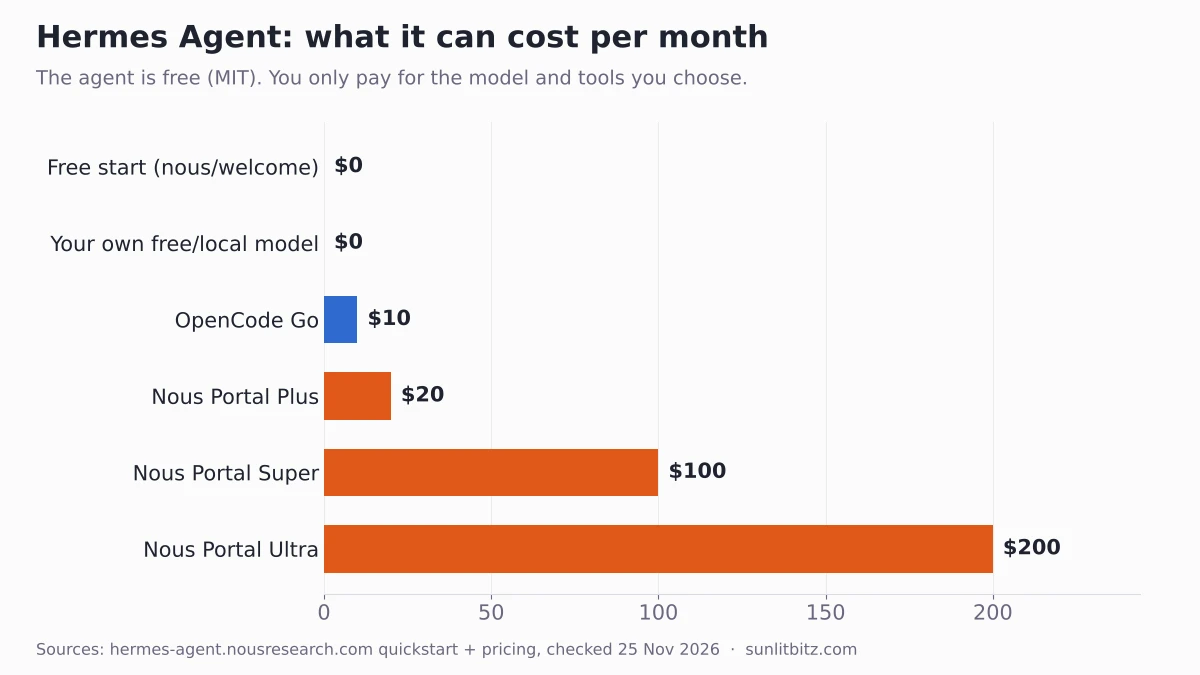
What can cost money is the AI model the agent uses to think, plus optional hosted tools like web search and image generation. You have four ways to power it:
- Free start: run
hermes setupand pick “Free, start now”. It uses the freenous/welcomemodel with no account or key. It is available once per OS user. - Your own key or plan: use OpenRouter, an OpenAI or Anthropic key, or a Claude Max plan. You pay that provider. OpenCode Go costs $10 a month.
- Local models: run a model on your own machine for $0 a month, as long as it has at least a 64K-token context window.
- Nous Portal: one subscription with 200+ models, hosted tools and one cloud agent.
Nous Portal pricing in 2026
| Plan | Price | Models | Cloud agent | Best for |
|---|---|---|---|---|
| Free | $0, pay as you go | Free models only | None | Trying Hermes |
| Plus | $20 / month | Free and paid | 4 GB RAM, 25 GB disk | Everyday personal use |
| Super | $100 / month (5× Plus usage) | Free and paid | 4 GB RAM, 100 GB disk | Frequent research and coding |
| Ultra | $200 / month (10× Plus usage) | Free and paid | 8 GB RAM, 100 GB disk | Heavy individual use |
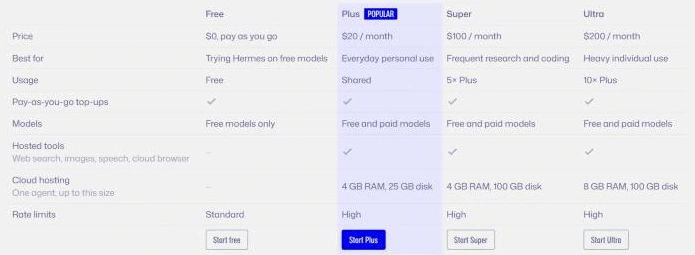
Key Takeaway: Start with the free option. Move to Plus ($20) only when you want hosted tools or a cloud agent that runs while your laptop is off. You never need Super or Ultra just to learn it.
Hermes Agent system requirements
| Requirement | |
|---|---|
| Windows | Windows 10 or 11 for the PowerShell installer; Windows 11 22H2+ for the desktop MSIX |
| macOS | macOS 12+; the desktop app is Apple Silicon only (no Intel Macs) |
| Linux | Any distro, installed from the terminal |
| Android | Termux on aarch64 devices |
| Python | 3.14, installed for you by the installer |
| Admin rights | Not needed on Windows |
| Model | Context window of 64K tokens or more |
How to install Hermes Agent on Windows
There are two ways to install it on Windows. Pick the desktop app if you hate terminals, and PowerShell if you want the full command-line agent.
Option 1: Hermes Desktop (easiest)
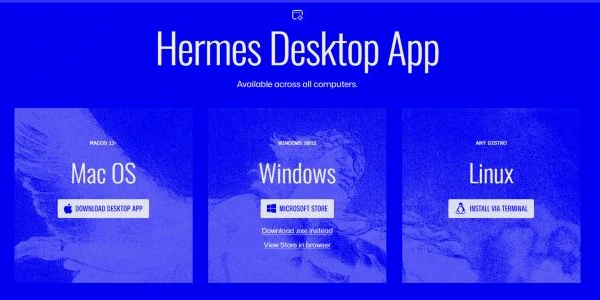
- Open the Hermes Agent website and scroll to Hermes Desktop App.
- Under Windows, click Microsoft Store, or Download .exe instead.
- Install it and open Hermes. No account is needed for the base app.
- Choose how to power it: the free model, your own API key, or a Nous Portal login.
Option 2: PowerShell (full agent)
Open Windows Terminal (the docs recommend it over the old cmd.exe) and run:
iex (irm https://hermes-agent.nousresearch.com/install.ps1)- Wait for the installer. It puts Hermes in
%LOCALAPPDATA%\hermes\and adds it to your PATH. It also installs Python 3.14 and Git if you do not have them. - Close and reopen the terminal, then check it worked with
hermes --version. - Run
hermes setupand pick Free, start now (orhermes setup --portalfor Nous Portal). - Start chatting with
hermes --tui. Ask something real, like “check my current folder and tell me what the main file is.” - Resume your last chat any time with
hermes -c.
Fix the #1 error: If Windows says
hermes: command not found, you only need to open a new PowerShell window so the PATH change loads. On Linux, macOS or WSL2, usecurl -fsSL https://hermes-agent.nousresearch.com/install.sh | bashinstead.
Connect Hermes Agent to Telegram
Once the chat works, run hermes gateway setup and follow the prompts for Telegram, Discord or WhatsApp. On Windows the gateway runs as a Scheduled Task, so it starts at login without admin rights. Check it with hermes gateway status.
The official quickstart gives one golden rule here: if Hermes cannot finish a normal chat, do not add more features yet.
Hermes Agent plugins and the Marketplace
The Hermes Marketplace is where you add new powers: memory tools, voice, browsing, new chat platforms and model providers. Each one installs with one command:
hermes plugins install <name>
hermes plugins enable <name>
Installing does not switch a plugin on. You must enable it, which is a smart safety step.
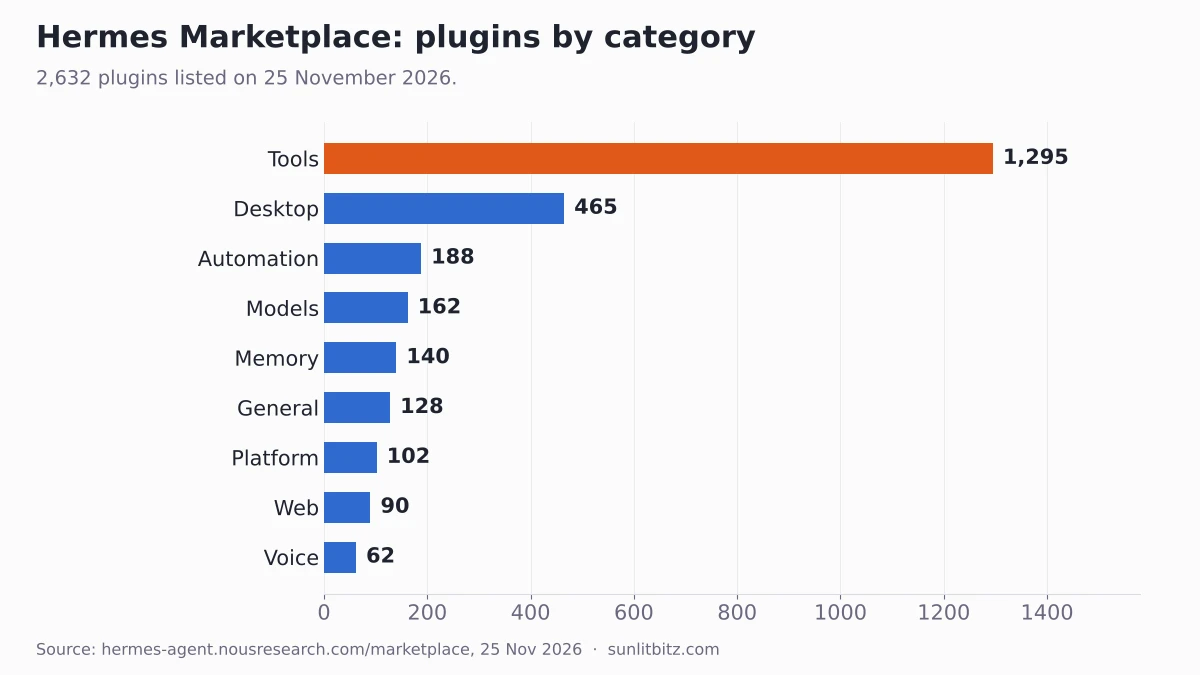
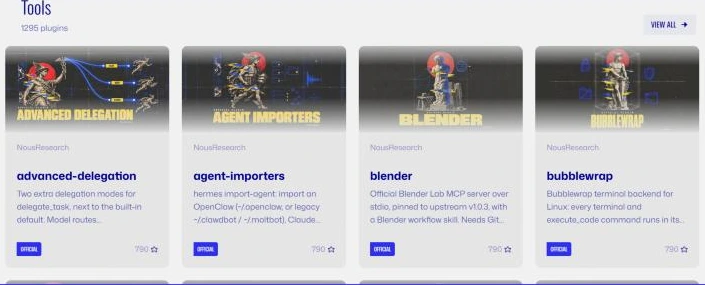
Listings carry one of three trust labels: Official (made by Nous Research), Verified (from partners) and Community (third parties). Each listing explains which credentials, ports and commands it uses.
Is Hermes Agent safe?
Hermes is legit: it is open source, the code is public, and it comes from a well-known AI lab. But an agent that runs commands on your computer needs some care.
- Plugins get full trust. The plugin docs warn that an enabled plugin runs with the same access as Hermes itself. Prefer Official and Verified ones.
- Keep keys in the .env file. On Windows that is
%LOCALAPPDATA%\hermes\.env, not your system environment variables. - Use a sandbox for risky jobs. Docker or a remote backend keeps the agent away from your personal files.
- Read the code of anything you hand a password or API key to.
Hermes Agent vs OpenClaw
If you already use OpenClaw, Hermes has an importer that brings over your persona, memories and skills, so switching is not a fresh start. If you pay for Claude Pro or Max, the Official Claude Subscription plugin lets Hermes run on that plan through the Claude Code CLI instead of a separate API key.
Who should use Hermes Agent?
- Yes: bloggers, freelancers and tinkerers who want one assistant that remembers their work and lives in their chat app.
- Yes: anyone with a cheap VPS who wants an always-on agent for free.
- Maybe not: people who only want quick answers. A normal chatbot is simpler; see our ChatGPT free limits guide.
- Not on an Intel Mac if you want the desktop app; use the terminal install instead.
Frequently asked questions
What exactly is Hermes Agent?
Hermes Agent is a free, open-source AI agent by Nous Research. It runs on your computer or a server, remembers you between sessions, creates its own skills and can be reached through the terminal, a desktop app or chat apps like Telegram.
Is Hermes AI Agent free to use?
Yes. The agent is MIT-licensed and free. The setup wizard also offers a free model (nous/welcome) with no account or API key. You only pay if you choose a paid model or a Nous Portal plan.
What is the cost of a Hermes Agent?
$0 for the software. Models cost whatever your provider charges, OpenCode Go is $10 a month, and Nous Portal plans are $20, $100 or $200 a month.
Can Hermes Agent work on Windows?
Yes. It runs natively on Windows 10 and 11 with no WSL or Docker. Install the desktop app from the Microsoft Store or run the PowerShell installer.
Does Hermes Agent have a desktop app?
Yes. Hermes Desktop is free for macOS 12+ (Apple Silicon), Windows 10/11 and Linux, with chat, sessions, file browsing and plugins in one window.
What are the requirements to use Hermes Agent?
Windows 10/11, macOS 12+ or Linux, an internet connection for cloud models, and a model with at least a 64K-token context window. The installer handles Python and Git for you.
How to make money with Hermes Agent?
Use Hermes as a work assistant: research and outline client articles, automate reports, or run social and support bots on Telegram. You can also build and sell skills or plugins, but no income is guaranteed.
Final verdict
It is the easiest way in 2026 to get a personal AI agent that actually remembers you, and the software costs nothing. Start with the free model, connect Telegram, add one or two Official plugins, and only pay for Nous Portal when you outgrow it.
How we wrote this: this is a setup and pricing guide built from the official Hermes Agent docs, website and Marketplace, checked on 25 November 2026. It is not a hands-on benchmark. Sources: Hermes Agent site, installation guide, Windows guide, quickstart, GitHub, Marketplace.