Four AI agents now promise to do your work while you sleep. One is free, one costs $100 a month, and one may not even open in your country.
Grok Bot vs Muse is the comparison everyone is searching, but OpenAI's Dots and the open-source MausBot belong in it too. Each one is a personal AI agent. Here is how all four compare on price, where they run, who holds your logins, and who each one is really for.
Quick answer: Muse is the best free personal agent, if you live where Meta offers it. Grok Bot is the cheapest paid agent ($30) and the best for teams. Dots is the most powerful but sits inside ChatGPT Pro (from $100). MausBot is the free, open-source Grok Bot alternative for people who already pay for Claude, ChatGPT or Grok.
In this article
Grok Bot vs Muse vs Dots vs MausBot at a glance
| Muse | Grok Bot | Dots | MausBot | |
|---|---|---|---|---|
| Made by | Meta | xAI | OpenAI | Milind Soni (open source) |
| Launched | 8 Sep 2026 | 11 Aug 2026 (beta), 1.0 on 11 Nov | 29 Sep 2026 | Aug 2026 (repo) |
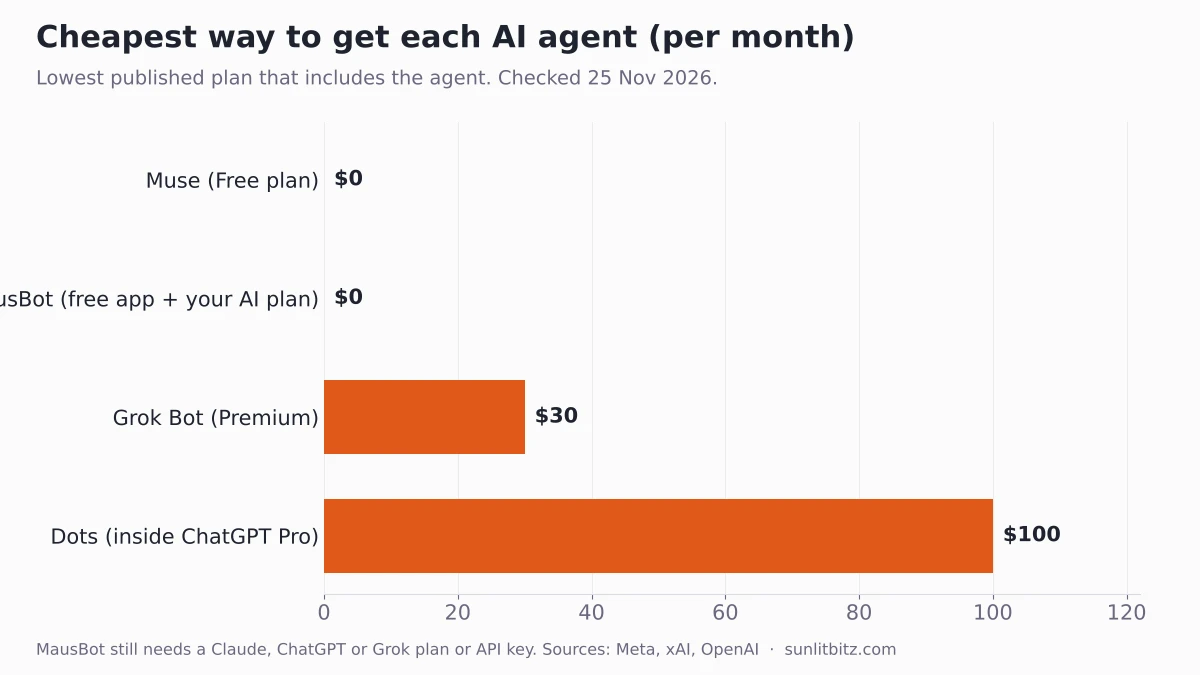
| Cheapest way in | Free | $30/month (Premium) | ChatGPT Pro, from $100/month | Free app + your own AI plan |
| Where it runs | Its own VM in Meta's cloud | A cloud computer run by xAI | Its own cloud computer | Your computer (or a paid cloud) |
| Best at | Personal errands, shopping, bookings | Team work in Slack and Teams | Deep work across 4,000+ apps | Running Claude, Codex and Grok as one team |
| Where you use it | iOS, Android, web, Mac | Mac, Windows, Linux, iPhone, iPad, Android | ChatGPT, Slack, Teams | Mac, Windows, Ubuntu (beta) |
| Countries | US, Canada, Japan, Singapore, Australia | Widely available | Pro markets | Anywhere |
What is each personal AI agent?
Muse (Meta)
Muse is Meta's personal AI agent, launched in the US on 8 September 2026. It runs on the Muse Spark model and can send emails, book travel, fill in forms, try to lower your bills and buy things for you. It keeps working after you close the app (TechRepublic).
Its big idea is security: each user gets a Muse Secure VM, and a separate Sentinel agent must approve anything Muse sends to the internet. Purchases go through Stripe Link with one-time card numbers (Meta).
Grok Bot (xAI)
Grok Bot is xAI's team of AI coworkers, and the agent most people compare with Muse in any Grok Bot vs Muse search. It looks like a messaging app: each bot has a name and a job, and it can work inside Slack, Microsoft Teams and even join a Zoom or Meet call on the right plans. Version 1.0 arrived on 11 November 2026 (FourWeekMBA). Read our Grok Bot update guide for its newest features.
Dots (OpenAI)
Dots are OpenAI's always-on agents inside ChatGPT, and the main rival in any Dots vs Muse debate. They launched at DevDay on 29 September 2026. Each dot runs on GPT-6 Astra, has its own cloud computer and connects to more than 4,000 apps. You can talk to it in ChatGPT, Slack or Teams (Reworked).
MausBot (open source)
MausBot, also called OpenMausBot and first named OpenGrokBot, is a free, Apache-2.0 desktop app and the best-known Grok Bot alternative. Every contact in its chat list is a real agent. It runs the Claude, Codex or Grok tools you already pay for, or any OpenAI-compatible model (GitHub).
Grok Bot vs Muse price: what each agent really costs
| Agent | Free option | Paid plans (per month) | Watch out for |
|---|---|---|---|
| Muse | Yes, “free for most of what people need” | Power $20, Maximum $100 | Only in 5 countries |
| Grok Bot | Trial credit only | Premium $30, Super $100, Ultra $200, Team $30/seat | Weekly usage pool; extra use is billed |
| Dots | No | Included in ChatGPT Pro ($100, $200 or $500) and Business Premium | Tasks it starts in Codex count toward your ChatGPT limits |
| MausBot | Yes, free app | Paid MausBot Cloud for always-on bots | You pay your own AI providers; bots stop when your laptop sleeps |
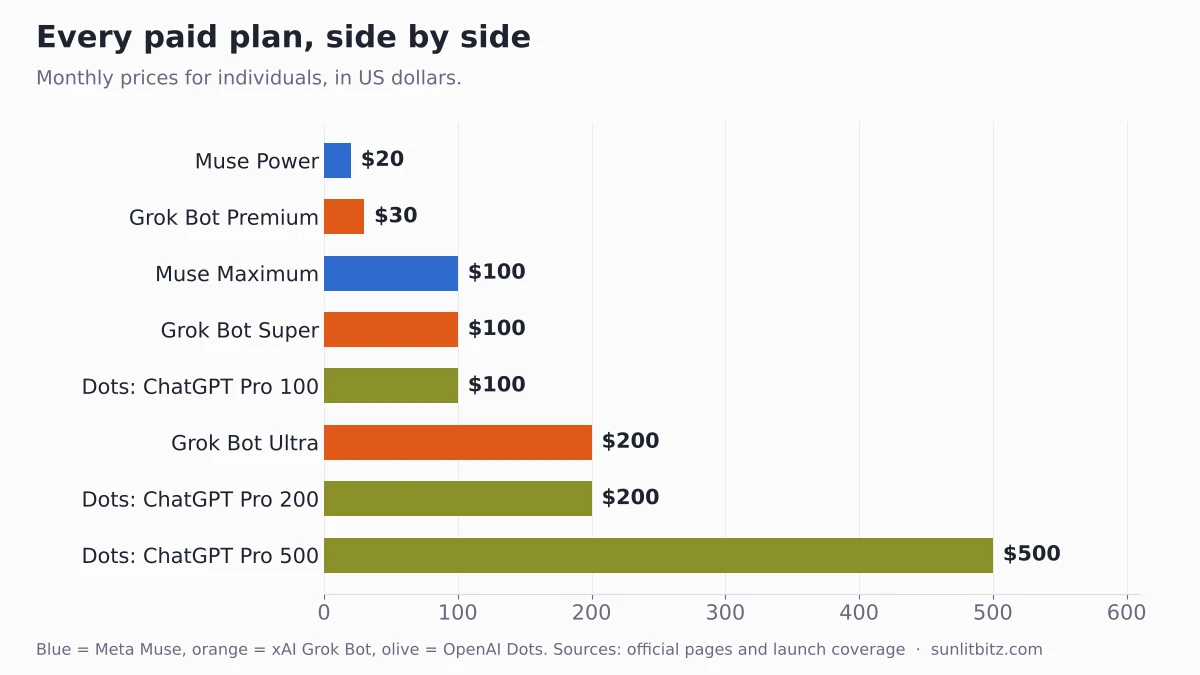
On Muse AI pricing, Meta is the most generous: the free plan covers most tasks, and Power at $20 is the cheapest paid personal AI agent plan here. In Dots vs Muse terms, Dots starts five times higher.
Quick Stat: A year of the cheapest Dots access costs $1,200 (ChatGPT Pro 100). A year of Grok Bot Premium costs $360. Muse Free and the MausBot app cost $0.
Grok Bot vs Muse vs Dots: where does your data live?
This is the question that matters most with agents, because you hand them your email, calendar and sometimes your card.
- Muse: a dedicated VM in Meta's cloud, with logins stored where Muse itself cannot read them. But Meta has admitted the VM is not technically inaccessible to Meta, only off-limits by policy (TechRepublic).
- Dots: its own cloud computer. You can open that computer to watch it work, set rules to allow, block or require approval for actions, and some tasks, like changing a password, always stay with you.
- Grok Bot: a cloud computer run by xAI. Each connector tool can be set to Always allow, Auto-review, Needs approval or Blocked. Its bots share one computer, so files and logins are not isolated between bots.
- MausBot: your own machine. Nothing leaves it except calls to the AI provider you choose. The trade-off: some API keys sit unencrypted in a config file, and the Windows installer is not code-signed.
Key Takeaway: If privacy is your top worry, MausBot keeps the most on your own disk. If you want the most guard rails, Muse's Sentinel and Dots' approval rules do the most work for you.
Can you use a personal AI agent outside the US?
This decides more than any feature list. Muse is live only in the US, Canada, Japan, Singapore and, since 17 November 2026, Australia (Meta). Elsewhere, including Europe, Africa and the Middle East, the sign-up stops.
Grok Bot and Dots follow their parent subscriptions, so they reach far more countries. MausBot works anywhere you can download it from GitHub.
How to get started with each agent
Muse
- Download the Muse app (iOS or Android) or open it on the web or Mac.
- Sign in with your Meta account. If your country is not supported, sign-up stops here.
- Connect the apps you want it to use, like email and calendar.
- Add a payment method through Stripe Link if you want it to buy things for you.
- Give it a task in plain words and let it run in the background.
Grok Bot
- Pick a plan: Premium ($30), Super ($100), Ultra ($200) or Team ($30 per seat).
- Install the app on Mac, Windows, Linux, iPhone, iPad or Android.
- Create a bot, give it a name and a job, and connect its tools.
- Set each tool to Always allow, Auto-review, Needs approval or Blocked.
- For teams, add the bot to a Slack or Teams channel.
Dots
- Subscribe to ChatGPT Pro or Business Premium; your first dot is included.
- Create a dot from ChatGPT and describe its job.
- Connect the apps it needs from the 4,000+ available.
- Set rules for what it may do alone and what needs your approval.
- Talk to it in ChatGPT, Slack or Teams.
MausBot
- Download the free app from the OpenMausBot GitHub releases page (Mac, Windows or Ubuntu beta).
- Install the Claude, Codex or Grok command-line tool you already pay for, or add an OpenAI-compatible API key, for example from OpenRouter.
- Create agents in the chat list and give each one a role.
- Add connectors such as Gmail, Slack, GitHub or Notion through Composio.
- Keep your computer awake, or pay for MausBot Cloud if you want bots that never stop.
Grok Bot vs Muse vs Dots vs MausBot: safety controls
| Control | Muse | Grok Bot | Dots | MausBot |
|---|---|---|---|---|
| Approval before risky actions | Yes, Sentinel agent checks internet actions | Yes, per tool | Yes, rules you set | Depends on the model tool you run |
| Separate computer per agent | Yes, a VM per user | No, bots share one computer | Yes, one per dot | No, it uses your machine |
| Watch it work live | In the app | In the app | Yes, open the dot's computer | Yes, on your own screen |
| Safe payments | One-time Stripe Link cards | Not a focus | Password changes stay with you | Not built in |
| Open source | No | No | No | Yes, Apache-2.0 |
The pattern is clear: the big three keep the agent in their cloud and add guard rails, while MausBot gives you full control and full responsibility.
Limitations you should know
- Muse: only in five countries, and Amazon blocked it from shopping on Amazon.com in September 2026, so some stores may refuse it.
- Grok Bot: usage comes from a weekly pool, and heavy work is billed as extra usage on top of your plan.
- Dots: no plan of its own, so the cheapest way in is $100 a month, and its work in Codex counts toward your ChatGPT limits.
- MausBot: a young project with many open issues; the Windows app is unsigned, and bots stop when your laptop sleeps.
Grok Bot vs Muse: which personal AI agent should you choose?
| If you… | Pick |
|---|---|
| Want a free personal agent and live in a supported country | Muse |
| Run a small team that lives in Slack or Teams | Grok Bot |
| Already pay for ChatGPT Pro and need the strongest model | Dots |
| Already pay for Claude, ChatGPT or Grok and want one free app to run them together | MausBot |
| Want an open-source agent that remembers you and runs on a cheap server | Hermes Agent (see below) |
Not on this list but worth a look: Hermes Agent, the free MIT-licensed agent from Nous Research. Like MausBot, it lets you bring your own model, and it has a free starter model.
Grok Bot alternative options
If Grok Bot's $30 starting price is too much, MausBot is the closest free Grok Bot alternative, built on purpose as an open-source copy. Muse is the closest free consumer option if you live in a Muse country. Dots is the upgrade if you need more power, not a lower bill.
Frequently asked questions
Is Grok Bot actually good?
For teams, yes. Its 1.0 version works inside Slack and Teams, can join meetings on higher plans and asks before sensitive actions. For one person on a budget, Muse Free or MausBot gives you an agent for less.
Is Muse worth the money?
Most people never need to pay: Meta says Muse is free for most of what people need. Power ($20) and Maximum ($100) only make sense if you hit the free limits often.
What is Grok Bot best for?
Work. Its bots take a job, such as sales follow-ups or meeting notes, sit in your team chat and offer to take on work they notice.
Is there an open-source alternative to Grok Bot?
Yes. MausBot (OpenMausBot) is a free, Apache-2.0 app built as an open-source Grok Bot alternative. Hermes Agent is another free, open-source agent.
What is the difference between Dots and Muse?
Dots live inside ChatGPT Pro, run on GPT-6 Astra and focus on work across 4,000+ apps. Muse is a standalone, free-first app from Meta focused on personal errands, shopping and bookings.
Is Muse free?
Yes. On Muse AI pricing, the answer is simple: Meta's Muse agent has a free plan that covers most everyday tasks. Note that muse.ai is a different company, a video hosting site, not Meta's agent.
How much is Muse per month?
Muse is free, Muse Power costs $20 a month and Muse Maximum costs $100 a month.
What is better than a Grok Bot?
It depends on the job. Dots is more powerful for deep work if you already pay for ChatGPT Pro, and Muse is better for personal errands. For a free option, MausBot runs the AI plans you already have.
Which AI agent is cheapest?
Muse Free and the MausBot app both cost $0. MausBot still needs an AI plan or API key behind it. The cheapest paid agent is Grok Bot Premium at $30 a month.
Final verdict
There is no single winner in Grok Bot vs Muse vs Dots vs MausBot. Every personal AI agent here fits a different person. Start with the free option you can actually use: Muse if you are in a supported country, MausBot or Hermes if you are not. Pay for Grok Bot when a team needs it, and for Dots only if you already live in ChatGPT Pro.
How we wrote this: this comparison uses the official announcements, pricing pages and launch coverage listed here, checked on 25 November 2026. We have not run long tests of each agent, and Muse is not available in our country. Sources: Meta Muse launch, Muse in Australia, OpenAI Dots, Reworked on Dots, ChatGPT Pro tiers, Grok Bot 1.0 pricing, OpenMausBot, TechRepublic.