Grok Bot just learned to book your hotel. It also got a private door into your home network and a new set of brakes for every tool it touches.
Matt Palmer from the Grok Bot team walked through four updates in a short video on 23 November 2026. Below you get each one in plain words, what it means for bloggers and creators, and the limits you should know before you hand an AI agent your bookings.
In this article
The short answer
This Grok Bot update adds four things: hotel booking (flights are rolling out), a Tailscale connection to private MCP servers, per-tool permission levels for every connector, and image markup in the desktop app.
The booking feature gets the headlines. The permission levels matter more, because they decide what your Bot may do without asking you first.
What is Grok Bot?
It is xAI's app for AI teammates. Each Bot has a name and a job, and it works on a persistent cloud computer with a browser, a file system and a terminal. That means it keeps working after you close your laptop.
It connects to apps like Gmail, Google Calendar, Slack, Notion and Google Drive, plus custom MCP servers. You talk to it from the desktop app or your phone, like you would message a coworker.
- Launched: as a beta in August 2026, built together with Cursor.
- Version 1.0: arrived on 11 November 2026 with Team Bots for Slack and Microsoft Teams.
- Runs on: macOS, Windows and Linux desktops, plus iPhone, iPad and Android.
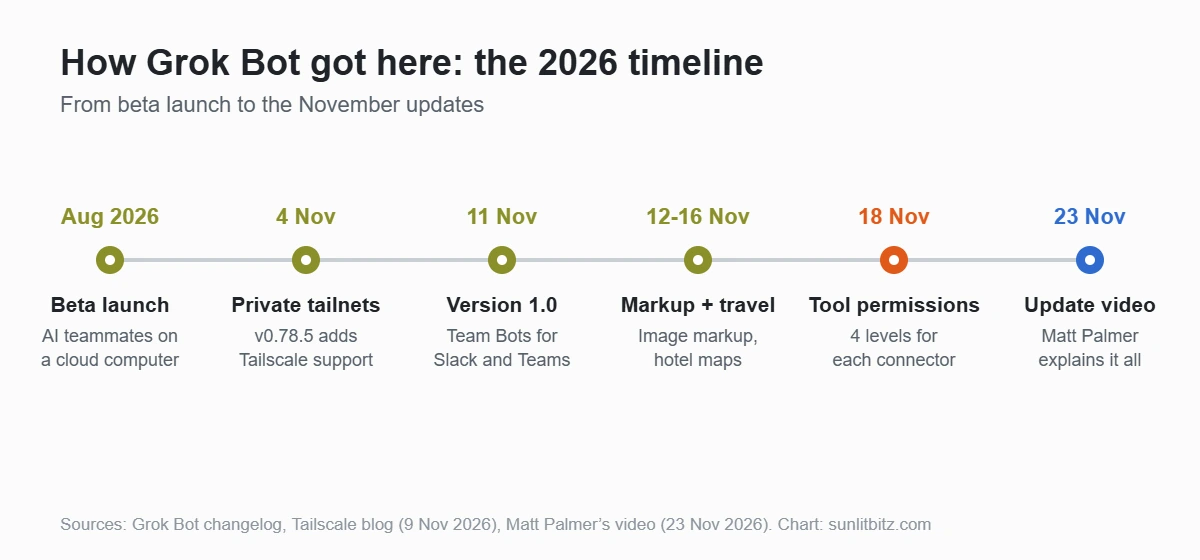
Key Takeaway: This is not the Grok chatbot inside X. It is a separate agent app that takes actions for you, which is why the new permission controls matter so much.
The 4 Grok Bot updates at a glance
| Update | What it does | Status |
|---|---|---|
| Hotel booking | Finds hotels that fit your trip and books them, then sends you to the provider's site to finish | Live (flights rolling out) |
| Tailscale MCP | Lets the Bot reach MCP servers on your private network, such as a home media server | Live |
| Tool permissions | Set each connector tool to Always allow, Auto-review, Needs approval or Blocked | Live |
| Image markup | Draw on an image or add numbered notes, then ask the Bot to make the edits | Live in the desktop app |
1. Hotel and flight booking
Tell your Bot where you are going and when, and it searches for hotels that match your plan. When you pick one, it takes you to the hotel provider's site to complete the booking. Flight booking is rolling out now.
The changelog adds two useful details. Hotel pages now show maps and room cards you can scroll, and when the Bot books a flight it follows each airline's own steps. If it cannot confirm the final purchase, it sends you the link instead of clicking again.
- Good for: conference trips, blogger meetups, or any trip where you compare many hotels.
- Watch out for: prices change fast. Always check the final price on the provider's page before you pay.
2. Tailscale and private MCP servers
Tailscale is a private network that links your own devices. With this update, your Bot can join your network (your “tailnet”) as a device tied to your account, so it can reach MCP servers that are not on the public internet.
In the video, the examples are a home Plex media server and a server that controls devices on a home network. For a business, it could be an internal tool or database you never want exposed online.
Tailscale says you can limit the Bot to one internal server instead of everything your laptop can reach. On any plan you can tag the Bot's device and write rules for that tag. Premium and Enterprise plans add custom posture rules for tighter control.
Quick Tip: Give the Bot access to one MCP server first. Expand only after you have watched it work for a while.
3. Tool permissions for every connector
This is the change I would turn on first. Every tool inside a connector (for example, “send email” inside Gmail) can now get one of four permission levels:
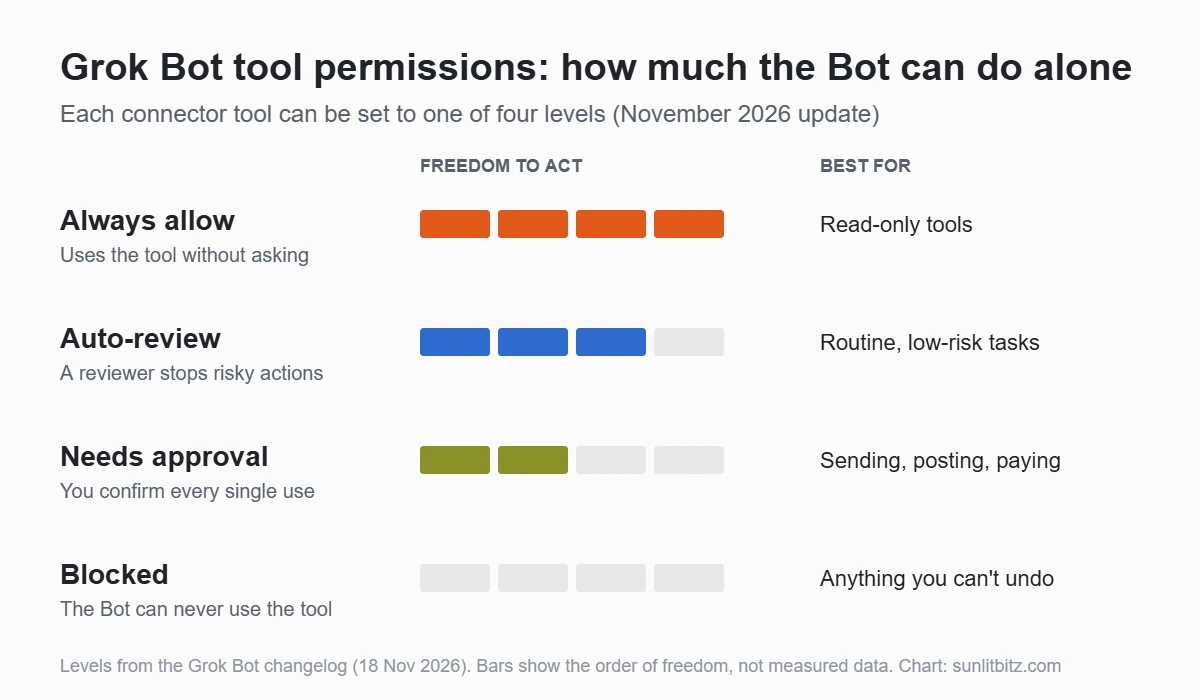
- Always allow: the Bot uses the tool without asking. Best for read-only tools like searching your calendar.
- Auto-review: an automatic review step checks each action and decides whether to ask you first.
- Needs approval: you confirm every single use. Best for sending email, posting or paying.
- Blocked: the Bot can never use that tool.
The app already had safety cards for purchases, phone calls and email. These new levels let you set the rules once, tool by tool, instead of answering the same pop-up again and again.
4. Image markup in the desktop app
Open an image, choose Markup, then draw on it or drop numbered comments where you want changes. Describe the edits and the Bot makes them. You need version 0.79.2 or later.
For bloggers this is handy for featured images and screenshots: circle the part you want changed instead of trying to explain it in words. One catch from the changelog: images the Bot creates with Grok Imagine count toward your Bot usage.
What this update means for bloggers
| Blogging task | Useful update | Suggested permission |
|---|---|---|
| Book travel for an event you will cover | Hotel booking | Needs approval |
| Pull data from your own server or tools | Tailscale MCP | Always allow (read-only) |
| Send pitch or outreach emails | Tool permissions | Needs approval |
| Fix a featured image or screenshot | Image markup | Not needed |
| Publish or delete posts | Tool permissions | Blocked until you trust it |
Key Takeaway: Use Always allow for reading, Needs approval for anything that sends, posts or pays, and Blocked for anything you could not undo.
If you are choosing a personal AI agent, see how Grok Bot stacks up against Meta's Muse, OpenAI's Dots and MausBot in our Grok Bot vs Muse comparison.
Limits to know before you start
- It is not free to run: it uses a weekly usage pool shared with Cursor and the Grok apps, and extra usage is paid with prepaid credit. Check the current plans before you subscribe.
- Bots share one computer: all your Bots share the same files, browser sessions and logins, so separate Bots are not a security wall.
- Browser work can break: websites change and CAPTCHAs appear, so a step that looks done may still need a check.
- Region gaps: tagging @bot on X is not available in some regions, including the EU, UK and Australia.
Grok Bot: questions people ask
Is Grok Bot free?
Not really. It is included with some paid xAI and Cursor plans and runs on a weekly usage pool, with a one-time trial credit for new users. Free plans do not include it, so check xAI's plans page for the current options.
Can Grok Bot book hotels and flights?
Yes. It can find and book hotels based on your travel plans and then send you to the provider's site to finish. Flight booking is rolling out as of late November 2026.
Is Grok Bot safe to use?
It can be, if you set it up carefully. Use the new per-tool permissions, keep “Needs approval” on anything that sends, posts or pays, and limit Tailscale access to the one server the Bot needs.
What is the difference between Grok and Grok Bot?
Grok is xAI's chatbot that answers questions. The Bot app is a separate agent that uses its own cloud computer to do multi-step work for you, such as booking, research or updating your calendar.
What is an MCP server?
MCP (Model Context Protocol) is a standard way for AI agents to use tools and data. An MCP server gives an agent a set of actions it can take, such as reading a database or controlling a device.
Watch more from Matt Palmer
Matt posts short update videos as features ship. Follow Matt Palmer on YouTube for the next one, and check the official Grok Bot changelog for small changes between videos.
Want more honest AI tool breakdowns like this? Read our GPT-6.2 Astra review and our Claude Fable 5.2 review.