
Grammarly and QuillBot both promise to clean up your writing for free. I gave them the exact same messy paragraph to see which one actually catches more mistakes.
This Grammarly vs QuillBot test uses both free web tools, no account, on 18 November 2026, and re-tested on 23 November 2026. You get the real screenshots, the score for each tool, the current prices and a clear answer on which one a blogger should use.
In this article
The short answer
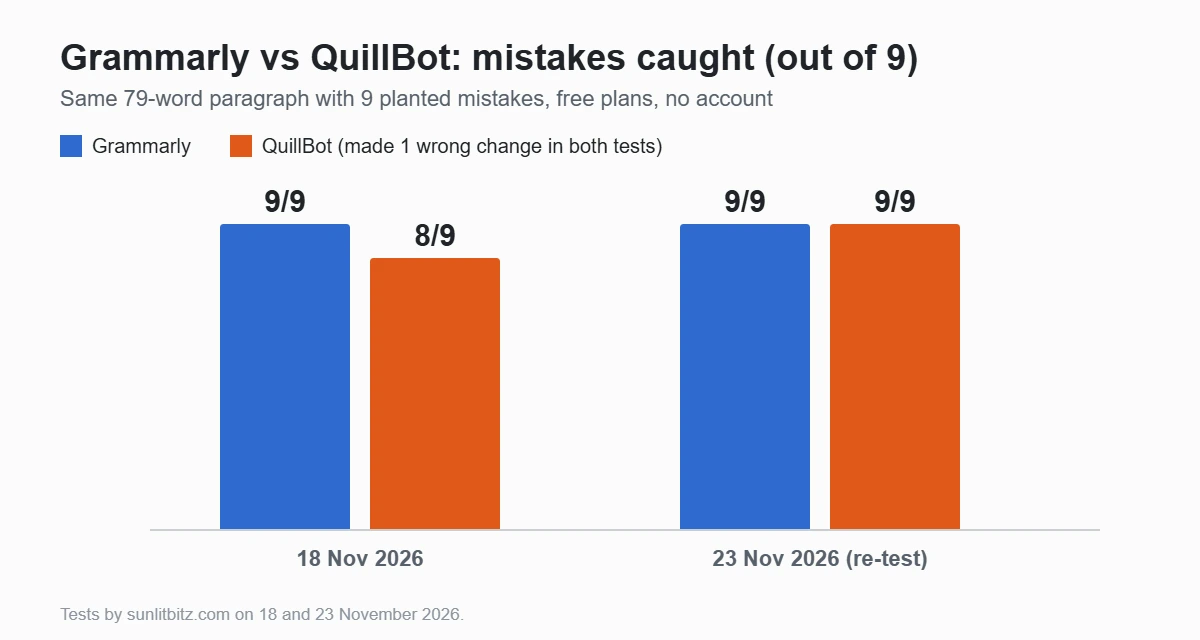
Grammarly won our first Grammarly vs QuillBot grammar test, 9 mistakes to 8. In our re-test on 23 November, QuillBot caught all 9 too, but it still made one wrong change, while Grammarly changed nothing that was right. QuillBot is cheaper and gives handy writing scores, but its free paraphraser now asks you to sign up first.
- Pick Grammarly if you mainly need to fix your own drafts before you publish.
- Pick QuillBot if you rewrite a lot of text and want the cheaper paid plan.
- Use both free plans if you are just starting: they cost nothing and do different jobs.
Grammarly vs QuillBot at a glance
| Grammarly | QuillBot | |
|---|---|---|
| Main job | Grammar and clarity editor | Paraphrasing (rewriting) |
| Mistakes caught in our tests | 9 of 9 (both tests) | 8 of 9 (18 Nov), 9 of 9 (23 Nov) |
| Wrong change in our test | None | 1 (changed “QuillBot” to “Quillbot”) |
| Free paraphraser without account | Yes, up to 125 words | No, sign-up needed in our test |
| Extra in free grammar check | Hover cards with the fix | Grammar, Fluency, Clarity and Engagement scores |
| Paid plan, billed monthly | $30 a month | $19.95 a month |
| Paid plan, billed yearly | $12 a month ($144 a year) | $8.33 a month ($99.95 a year) |
How I tested Grammarly and QuillBot
I wrote one 79-word blogger paragraph and hid 9 common mistakes in it: their/there, its/it's, then/than, your/you're, two subject-verb errors (“blogger need”, “tools has”), “it save”, and the clunky “more clear”. Then I pasted it into Grammarly's free grammar checker and QuillBot's free grammar checker, without signing in.
Here is the exact text both tools received:
Their are three reasons why every blogger need a good AI writing tool in 2026. First, it save you hours of editing time, especially when your writing late at night. Second, a tool can help you sound more clear and more professional to you're readers. Third, most tools has a free plan, so you can test them before you pay anything. In my opinion, its better to try both Grammarly and QuillBot then to guess which one is best.
For the second test I gave both paraphrasing tools the same short blog intro. One paragraph is a small sample, so treat this as a practical check, not a lab benchmark.
Grammarly vs QuillBot test 1: grammar check
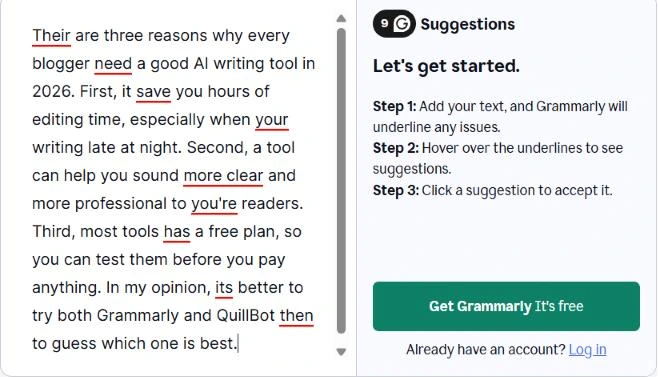
Grammarly result: 9 out of 9
Grammarly underlined all nine problems within a few seconds. Hovering over “Their” showed a card with the fix “There”, and the same worked for every other underline. It did not flag anything that was actually correct.
QuillBot result: 8 out of 9, then 9 out of 9
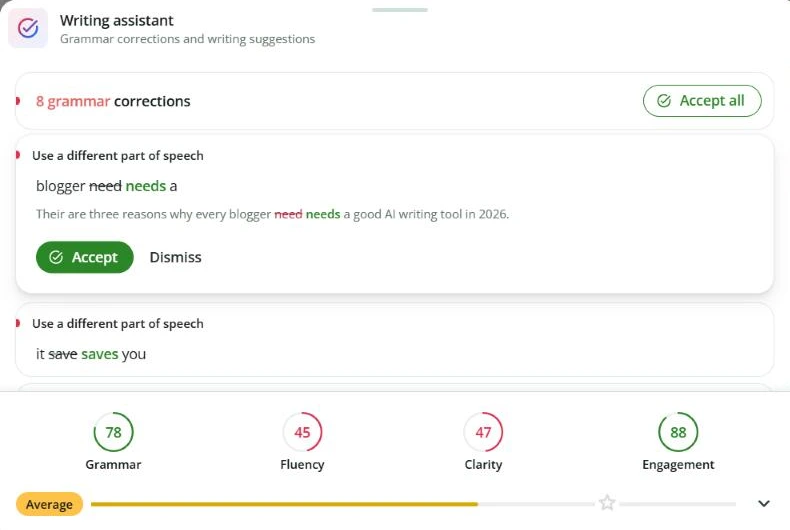
QuillBot opened the text in its document editor and listed 8 grammar corrections. It also gave the paragraph scores: Grammar 78, Fluency 45, Clarity 47 and Engagement 88. That is useful feedback Grammarly's free web checker does not show.
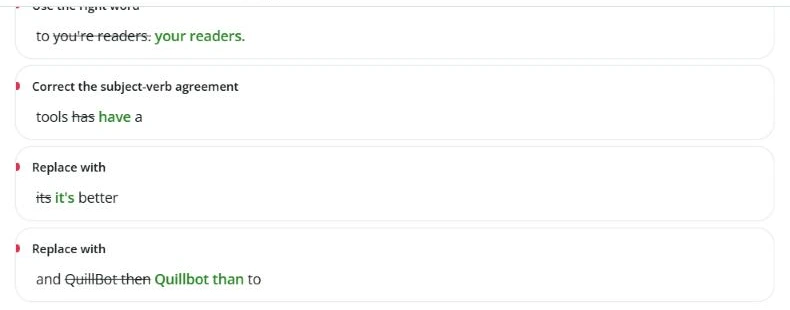
On 18 November it missed “Their are three reasons”, the very first mistake. When we re-tested on 23 November, it flagged that one too, in a separate “Use the right word” card, so it caught all 9. And in the last sentence it bundled a wrong change: it wanted to write “Quillbot” instead of “QuillBot”, its own brand name.
| Mistake | Correct form | Grammarly | QuillBot |
|---|---|---|---|
| Their are | There are | ✅ | ❌ missed on 18 Nov, ✅ caught on 23 Nov |
| blogger need | blogger needs | ✅ | ✅ |
| it save | it saves | ✅ | ✅ |
| your writing | you're writing | ✅ | ✅ |
| more clear | clearer | ✅ | ✅ |
| to you're readers | to your readers | ✅ | ✅ |
| tools has | tools have | ✅ | ✅ |
| its better | it's better | ✅ | ✅ |
| then to guess | than to guess | ✅ | ✅ |
Key Takeaway: Grammarly was the safer editor in both tests: it found every mistake and changed nothing that was right. QuillBot missed the very first mistake on 18 November and caught it on 23 November, but both times it wrongly renamed itself “Quillbot”.
Grammarly vs QuillBot test 2: paraphrasing
Paraphrasing is QuillBot's best-known feature, so I expected it to win here. This was the input:
AI writing tools can save bloggers a lot of time, but they cannot replace your own experience. Use them to fix mistakes and speed up your drafts, then add the stories and opinions that only you can share with your readers.
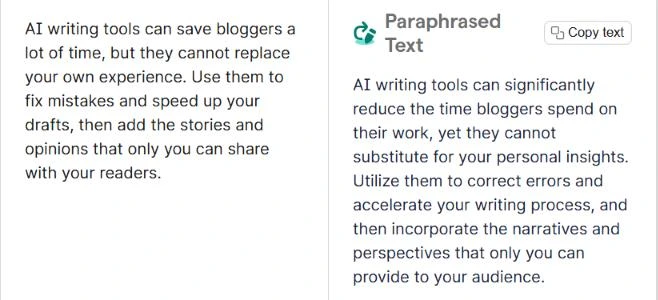
Grammarly paraphraser: works without an account
Grammarly's free paraphrasing tool rewrote it instantly, with a limit of 125 words per run:
AI writing tools can help bloggers save significant time, but they can't substitute your personal expertise. Utilize them to correct errors and expedite your drafts, then incorporate the narratives and viewpoints that only you can convey to your audience.
The meaning stayed the same, but the words got stiffer: “utilize”, “expedite” and “narratives” sound less like a friendly blog than the original. Fine for a quick idea, not something to paste in as is.
QuillBot paraphraser: works with a free account
QuillBot's page is titled “Paraphrasing Tool (Ad-Free and No Sign-up Required)”. But without an account, in both our tests (18 and 23 November), clicking Paraphrase showed a “Sign up to continue” window instead of a result.
So we signed in with a free QuillBot account and pasted the same text again. This time it worked straight away. In Standard mode it returned:
“Although AI writing tools can save bloggers a great deal of time, they cannot take the place of human experience. Utilize them to correct errors and expedite your drafts before adding the narratives and viewpoints that only you can convey to your audience.”
The meaning stayed the same. Some word choices, like “expedite” and “convey”, sound more formal than the original, so you may want to edit a few words back to your own voice.
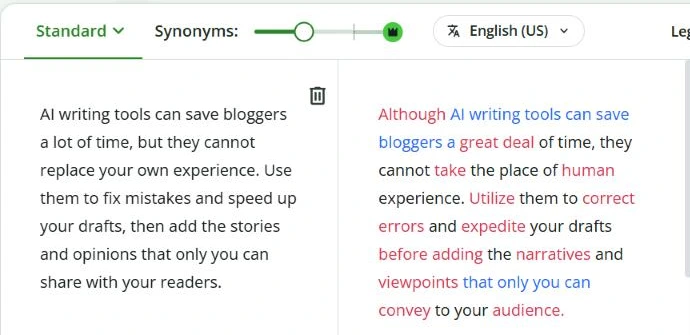
Key Takeaway: Grammarly's free paraphraser works with no account at all. QuillBot's free paraphraser needs a free account first, but then it works well and lets you pick modes like Standard, Fluency and Humanize.
Grammarly vs QuillBot price
In the Grammarly vs QuillBot price comparison, both tools have a free plan. The paid plans are where the gap shows, and the billing period changes the price a lot.

- Grammarly Pro: $12 a month when you pay for a year ($144), or $30 a month month-to-month. Its plans page showed a free trial, and its checker pages showed a 50% off Pro banner during our test.
- QuillBot Premium: $8.33 a month on yearly billing ($99.95), $13.31 a month every six months, or $19.95 month-to-month, according to QuillBot's own price FAQ.
Prices change often, especially around Black Friday. Check our Black Friday AI deals for bloggers list before you pay full price for either tool.
Grammarly vs QuillBot: which should bloggers choose?
Choose Grammarly if
- you write your own posts and want fewer mistakes before you hit Publish;
- you write in WordPress, Gmail or Google Docs and want checks as you type;
- you care more about accuracy than about the lowest price.
Choose QuillBot if
- you rewrite notes, summaries or old posts often;
- you want writing scores like Fluency and Clarity to track your drafts;
- your budget is tight: Premium costs less than Grammarly Pro.
In the Grammarly vs QuillBot choice, many bloggers end up using both: QuillBot to rework a rough paragraph, Grammarly to proofread the final draft. Both free plans are enough to start. If you also use a chatbot for drafts, see our ChatGPT Free vs Claude Free test.
Grammarly vs QuillBot: our verdict
In this Grammarly vs QuillBot test, Grammarly is the better free editor: 9 of 9 mistakes caught, no wrong changes, and a paraphraser that works without an account. QuillBot caught 8 of 9 on 18 November and all 9 in our 23 November re-test, but made one wrong change both times. It adds useful writing scores and has the cheaper paid plan. For checking your own blog posts, start with Grammarly; add QuillBot when rewriting becomes a regular part of your work.
Grammarly vs QuillBot FAQ
Is Grammarly still worth it in 2026?
The free plan is worth it for any blogger: in our test it caught all 9 planted mistakes. Grammarly Pro is worth paying for if you publish often and want full-sentence rewrites and tone changes; otherwise the free plan is enough.
Is Grammarly $12 a month or a year?
$12 a month, but only when you pay for a whole year, which is $144 upfront. If you pay month to month, Grammarly Pro costs $30 a month.
Is QuillBot better than Grammarly?
For paraphrasing and price, QuillBot can be the better pick. For catching grammar mistakes, Grammarly did better in our first test, 9 of 9 against 8 of 9. In our re-test both caught all 9, but QuillBot still made one wrong change. QuillBot's own blog reports a test where QuillBot won, so results depend on the text you test.
Is QuillBot free?
Yes. QuillBot has a free plan with its grammar checker and paraphraser. In our test, the free grammar checker worked without an account. The paraphraser asked us to sign up first, then worked fine with a free account.
Will I get flagged for AI if I use Grammarly?
Fixing spelling and grammar does not turn your text into AI writing. Full-sentence rewrites and AI-generated text can make writing read more like AI, and AI detectors are not fully reliable, so keep your own voice and use rewrites lightly.
Can I use Grammarly and QuillBot together?
Yes. A common setup is QuillBot to rephrase and Grammarly to proofread the final version. Both have free plans, so you can try this at no cost.