Grammarly Free is good, but it is not the only free grammar checker. So we gave five free alternatives the same messy paragraph and counted every mistake they caught.
This is a real test, run on 23 and 24 November 2026, with real screenshots. You will see which free Grammarly alternative catches the most, which ones make wrong changes, and which one fits you best.
In this article
The best free Grammarly alternatives (quick answer)
- ChatGPT Free: caught 9 of 9, no wrong changes. Best if you don't mind pasting text into a chat.
- QuillBot: caught 9 of 9 but made 1 wrong change. Best all-in-one free checker with writing scores.
- LanguageTool: caught 8 of 9 with 1 wrong change. Best free checker that underlines as you type.
- Sapling: caught 6 of 9, no wrong changes. Simple and clean.
- Harper: caught 1 of 9. Free, open source and fully private, but not a full grammar checker yet.
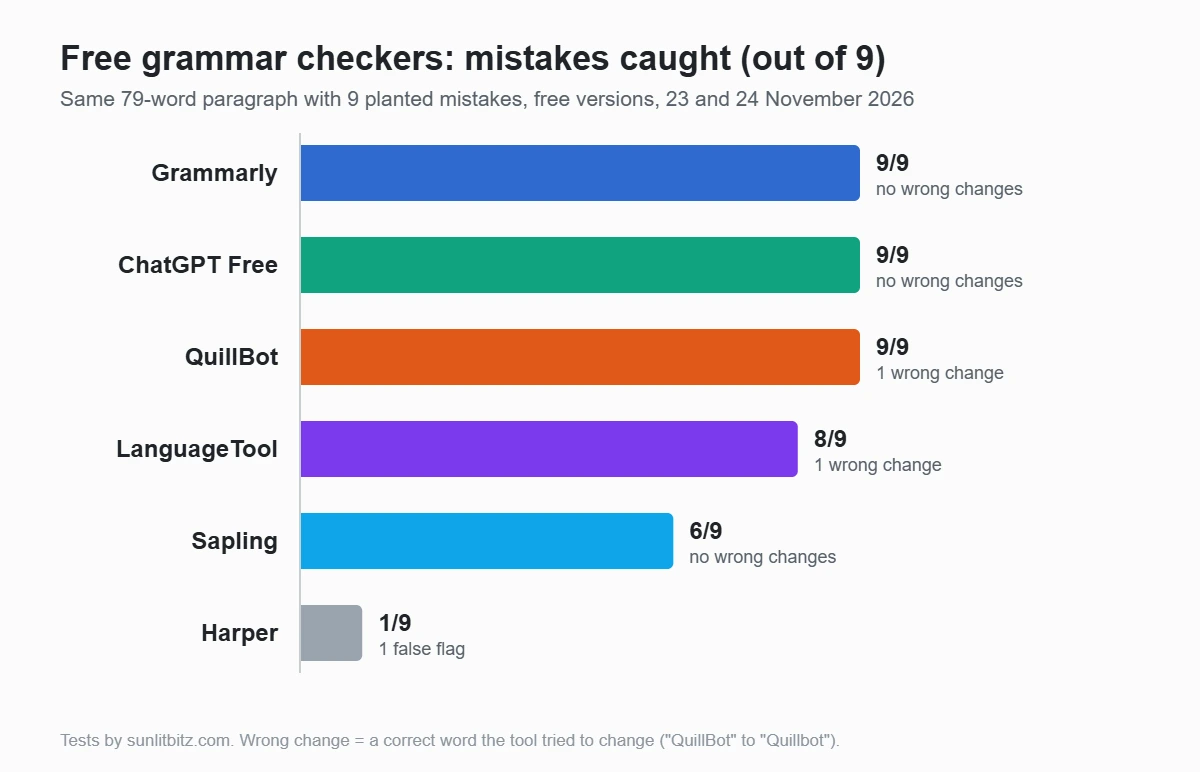
Key Takeaway: Only ChatGPT Free matched Grammarly Free with 9 of 9 and zero wrong changes. LanguageTool came closest among real-time grammar checkers.
How we tested
We used the same 79-word blogger paragraph from our Grammarly vs QuillBot test. It hides 9 common mistakes:
“Their are three reasons why every blogger need a good AI writing tool in 2026. First, it save you hours of editing time, especially when your writing late at night. Second, a tool can help you sound more clear and more professional to you're readers. Third, most tools has a free plan, so you can test them before you pay anything. In my opinion, its better to try both Grammarly and QuillBot then to guess which one is best.”
- Free versions only, no account where the tool allowed it.
- Caught = the tool flagged or fixed the mistake.
- Wrong change = the tool tried to change something that was already correct.
Results: which mistakes each tool caught
| Mistake | ChatGPT Free | QuillBot | LanguageTool | Sapling | Harper |
|---|---|---|---|---|---|
| Their → There | Yes | Yes | Yes | No | Yes |
| need → needs | Yes | Yes | Yes | Yes | No |
| save → saves | Yes | Yes | Yes | Yes | No |
| your → you're | Yes | Yes | Yes | Yes | No |
| more clear → clearer | Yes | Yes | No | No | No |
| you're → your | Yes | Yes | Yes | Yes | No |
| has → have | Yes | Yes | Yes | Yes | No |
| its → it's | Yes | Yes | Yes | Yes | No |
| then → than | Yes | Yes | Yes | No | No |
| Total | 9/9 | 9/9 | 8/9 | 6/9 | 1/9 |
| Wrong changes | 0 | 1 | 1 | 0 | 1 |
1. ChatGPT Free: 9 of 9, no wrong changes
We asked ChatGPT Free to fix the paragraph and list every change. It fixed all 9 mistakes and kept “QuillBot” spelled correctly, which two real grammar checkers got wrong.
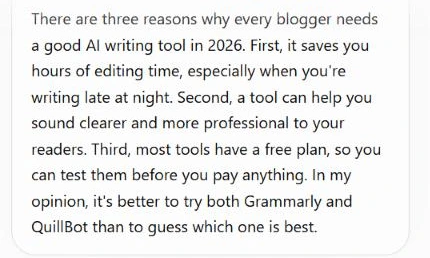
- Pros: best accuracy in our test, explains every change, unlimited everyday text chats on the free plan.
- Cons: no live underlines while you type; you paste text in and copy it back. It may also rewrite more than you want unless you ask it to keep your style.
- Price: free; Go is $8 a month and Plus $20. See our ChatGPT Free limits guide.
2. QuillBot: 9 of 9, one wrong change
QuillBot's free grammar checker caught all 9 in our 23 November re-test and added writing scores. But it tried to change “QuillBot” to “Quillbot”, its own brand name. Its paraphraser also asked us to sign up before it worked. Full details are in our Grammarly vs QuillBot test.
- Pros: catches almost everything, free writing scores, strong paraphraser with a free account.
- Cons: one wrong change; paraphraser needs a free account.
- Price: Premium is $19.95 a month or $8.33 a month billed yearly (QuillBot Premium).
3. LanguageTool: 8 of 9, one wrong change
LanguageTool underlined 8 mistakes with clear labels like “Use the right word” and “Correct the subject-verb agreement.” It missed “more clear” and, like QuillBot, suggested “Quillbot than”, changing the brand name too.
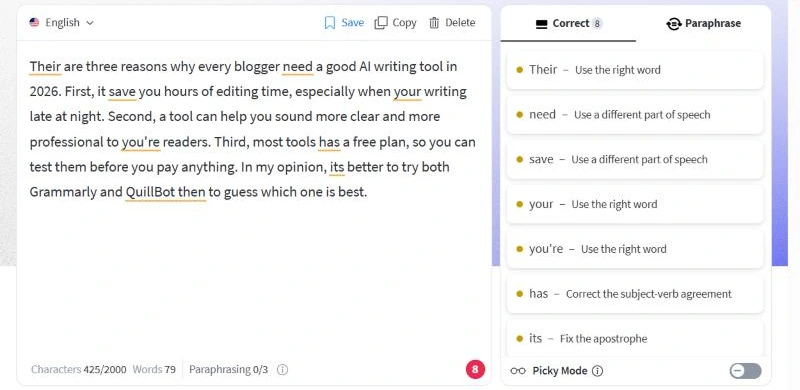
- Pros: real-time underlines, no account needed, browser extension.
- Cons: the free web checker allows 2,000 characters per check, as its editor showed us (425/2000).
- Price: free plan; Premium pricing is shown on LanguageTool‘s site and was discounted when we tested.
4. Sapling: 6 of 9, no wrong changes
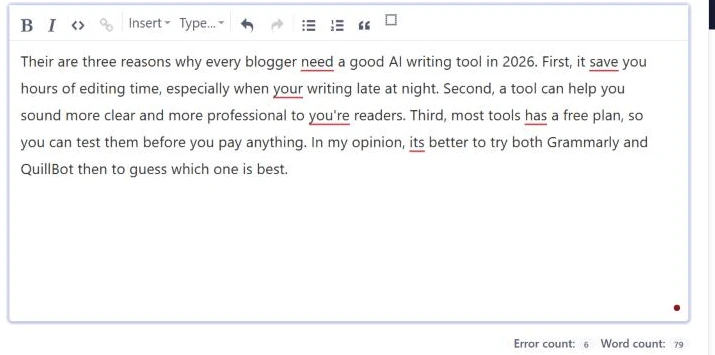
Sapling showed an “Error count” of 6. It caught the verb and word-choice mistakes but missed “Their are”, “more clear” and “then/than”. It never changed anything that was already right.
- Pros: clean editor, no wrong changes, made for support and sales teams too.
- Cons: missed 3 of 9 in our test.
- Price: Pro is $25 a month or $12 a month billed yearly (Sapling pricing).
5. Harper: 1 of 9, but 100% private
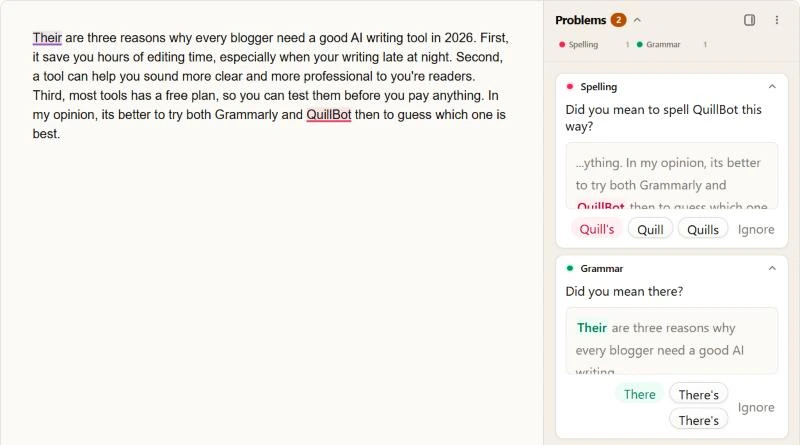
Harper is different. It is free, open source (Apache-2.0) and runs on your own device. Its site says: “Every check happens locally. No cloud round-trips, no telemetry, no LLM in the loop.” In our test it only caught “Their are” and wrongly flagged “QuillBot” as a spelling mistake.
- Pros: free forever, no account, no AI, your text never leaves your device; works in Chrome, Edge, Firefox, VS Code, Obsidian and WordPress.
- Cons: caught only 1 of 9 in our test.
- Best for: people who want a private “Grammarly alternative with no AI” for quick typo checks.
Key Takeaway: For accuracy, use ChatGPT Free or QuillBot. For typing in real time, use LanguageTool. For privacy, use Harper, but double-check its work.
Free Grammarly alternatives compared
| Tool | Score | Live underlines | No account needed | Paid plan |
|---|---|---|---|---|
| Grammarly Free (benchmark) | 9/9 | Yes | Yes | $30 / month or $12 yearly |
| ChatGPT Free | 9/9 | No | No | Go $8, Plus $20 |
| QuillBot | 9/9 | Yes | Yes | $19.95 / month or $8.33 yearly |
| LanguageTool | 8/9 | Yes | Yes | Premium (see site) |
| Sapling | 6/9 | Yes | Yes | $25 / month or $12 yearly |
| Harper | 1/9 | Yes | Yes | Free |
Is Grammarly still worth it in 2026?
Grammarly Free tied for the best score in our tests: 9 of 9 with no wrong changes. So the free plan is still worth it. Grammarly Pro ($30 a month, or $12 a month billed yearly, per Grammarly plans) is only worth paying for if you need full-sentence rewrites and tone changes every day.
Is ChatGPT or Grammarly better for grammar?
In our test, both caught 9 of 9 with no wrong changes. Grammarly is better while you type, because it underlines mistakes in place. ChatGPT is better when you want explanations or a full rewrite of a paragraph.
Our verdict
The best free Grammarly alternative depends on how you write. Paste-and-fix: ChatGPT Free. Live checking with writing scores: QuillBot. Live checking with fewer brand-name slips: LanguageTool. Privacy first: Harper. And if Grammarly Free already works for you, our test says you don't need to switch.
Free Grammarly alternatives FAQ
What is the best free Grammarly alternative?
In our test, ChatGPT Free and QuillBot both caught 9 of 9 mistakes. ChatGPT made no wrong changes; QuillBot made one. LanguageTool caught 8 of 9 and is the best free real-time checker after QuillBot.
Is there a completely free Grammarly alternative?
Yes. Harper is free and open source under the Apache-2.0 license with no paid plan. LanguageTool, QuillBot and Sapling also have free plans with limits.
Is there a Grammarly alternative with no AI?
Harper says it uses no large language model and checks everything locally on your device. In our test it caught only 1 of 9 mistakes, so use it for quick typo checks.
Will I get flagged for AI if I use Grammarly?
Fixing spelling and grammar keeps your own words, so it is unlikely to make your text look AI-written. Heavy rewrites with AI features are more likely to change your style.
Is ChatGPT or Grammarly better?
In our test both caught all 9 mistakes. Grammarly underlines mistakes as you type; ChatGPT fixes and explains a whole paragraph at once.
Is LanguageTool better than Grammarly?
Not in our test. LanguageTool caught 8 of 9 and made one wrong change; Grammarly Free caught 9 of 9 with none.
Sources: Grammarly plans, QuillBot Premium, LanguageTool, Sapling pricing, Harper, ChatGPT pricing.