Is Gemini free? Yes: all you need is a Google Account, and you get the Gemini app, image generation and even Deep Research for $0. The catch is a usage limit that Google never puts a number on.
I read Google’s own Gemini limits page and plans page on 27 November 2026, and ran a blog-intro prompt in Gemini the night before. Below: what the free plan includes, how its limits work, and when paying is worth it.
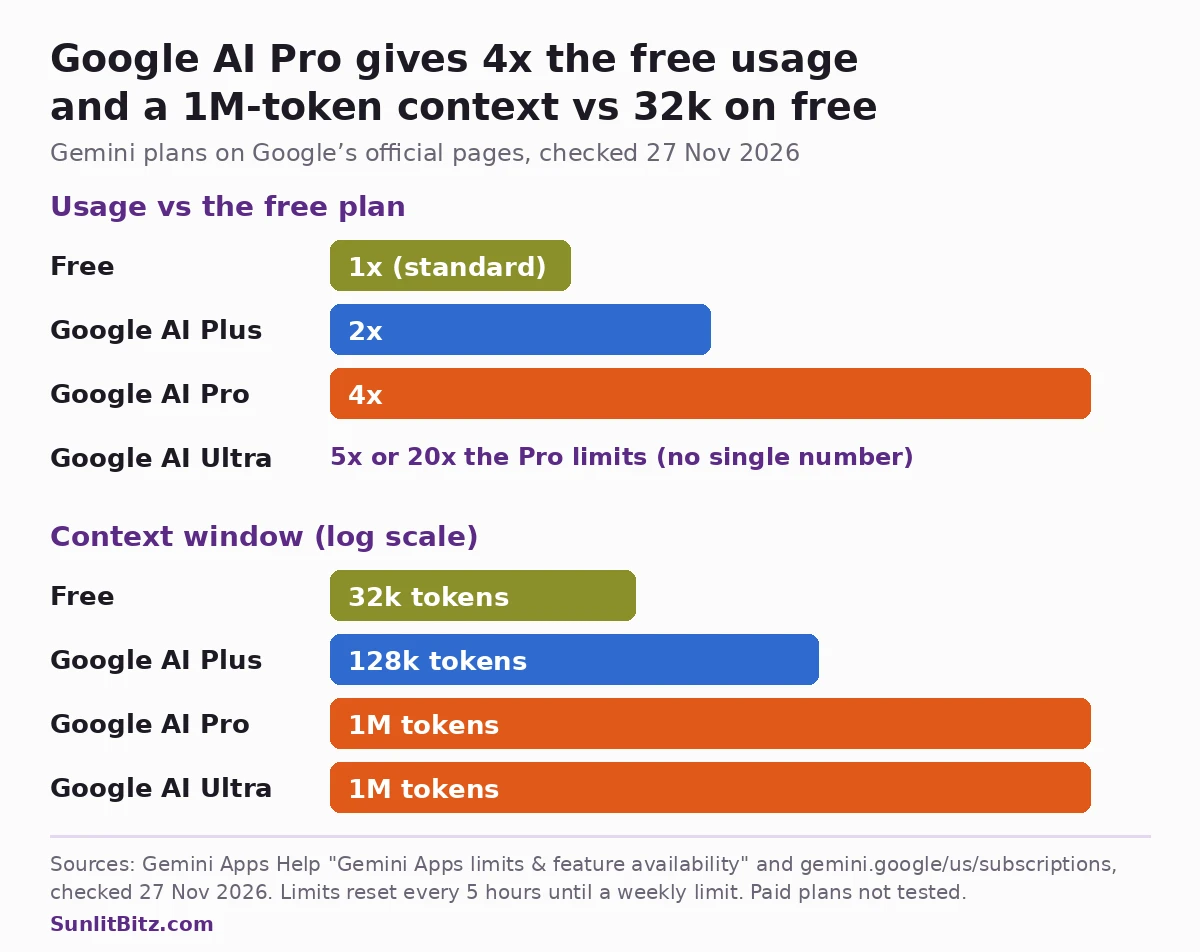
Key Takeaway: The free plan costs $0 with a Google Account and gives you “standard” usage limits that refresh every 5 hours until you hit a weekly limit, plus a 32k-token context window. Google publishes no daily prompt number. Google AI Plus ($4.99/month) doubles the usage, and Google AI Pro ($19.99/month) gives 4x the usage and a 1 million-token context window. Checked 27 November 2026.
The short answer
- Is Gemini free to use? Yes, in the app and on the web with any Google Account. Google lists the free plan at “$0/ month with a Google Account”.
- Limits are not a fixed number. Google calls the free tier “standard limits”: they refresh every 5 hours until you reach a weekly limit.
- Free has a smaller memory. The free context window is 32k tokens, against 1 million on Google AI Pro.
- Pay only if limits stop you. For drafting and editing a few blog posts a week, the free plan is a fair place to start.
In this article
Is Gemini free? What the free plan includes
The price: Google’s Gemini subscriptions page shows the free plan at “$0/ month with a Google Account”, next to Google AI Plus, Google AI Pro and Google AI Ultra. I checked it on 27 November 2026.
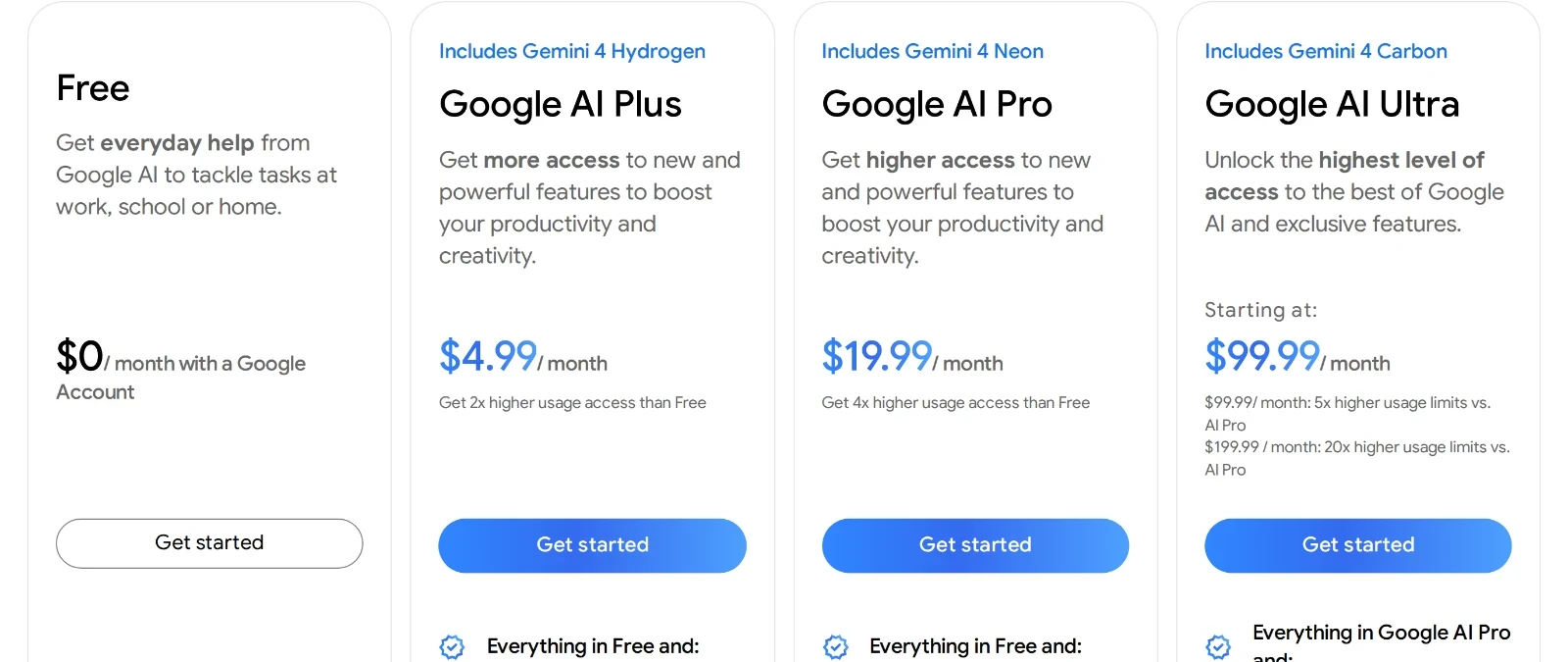
What you get: on the same day, Google’s pages listed these for the free plan:
- The Gemini app. The plans page says the free plan “Includes Gemini 4 Hydrogen”.
- Image generation and editing with Nano Banana 2 (Gemini Apps limits page).
- Deep Research, with a warning that it “may be unavailable during periods of high demand” (Gemini Apps limits page).
- Canvas and Audio Overviews (Gemini Apps limits page).
- 15 GB of cloud storage across Gmail, Drive and Photos (Gemini subscriptions page).
What is not on free: Google’s limits page marks video generation, the daily brief, scheduled actions and “Redo images with Nano Banana Pro” for the paid plans (Plus, Pro and Ultra), not for users without a plan.
Gemini free limits in 2026
Here are the Gemini free limits Google publishes, with the page each one comes from. Every row was checked on 27 November 2026.
| Limit | Gemini free plan | Source |
|---|---|---|
| Price | $0 a month with a Google Account | Gemini subscriptions |
| Usage limit | “Standard limits” (no number published) | Gemini Apps limits |
| Limit reset | Every 5 hours, until you reach your weekly limit | Gemini Apps limits, Gemini subscriptions |
| Context window | 32k tokens | Gemini Apps limits |
| Prompts per day | Not published by Google | Gemini Apps limits |
| Deep Research | Included, may be unavailable at busy times | Gemini Apps limits |
| Image generation | Included (Nano Banana 2) | Gemini Apps limits |
| Video generation | Not included (paid plans) | Gemini Apps limits |
| Cloud storage | 15 GB | Gemini subscriptions |
How many prompts does Gemini free allow?
Google gives no number. Its plans page says usage limits depend on how complex your prompts are, which features you use and how long the chat gets. You will see blog posts quoting a fixed daily number of prompts. I could not find any number on Google’s pages on 27 November 2026, so I do not repeat one here.
What this means in practice: short text prompts go further than long chats with files, Deep Research or images. Because chat length counts, starting a fresh chat for each new task should help your limit last longer.
What happens when you hit the limit?
Google says that when you reach your limit, Gemini shows a notification that tells you when your limit will refresh. The limits page describes a switch to Flash-Lite only for people with a Google AI subscription, so on the free plan you should expect to wait for the reset. Free users also come first if Google has to tighten things: the limits page says that when capacity changes, people without a Google AI plan may be limited before paying users. Google also says limits “may change without notice”.
What I saw when I used Gemini for a blog intro
The test: on 26 November 2026 at 22:42 (UTC+1), we pasted the same prompt we gave ChatGPT Free and Claude Free in the same session into a fresh Gemini chat: Write a 150-word intro for a blog post titled “7 Best AI Writing Tools for Blog Posts in 2026”. Friendly tone, no hype.
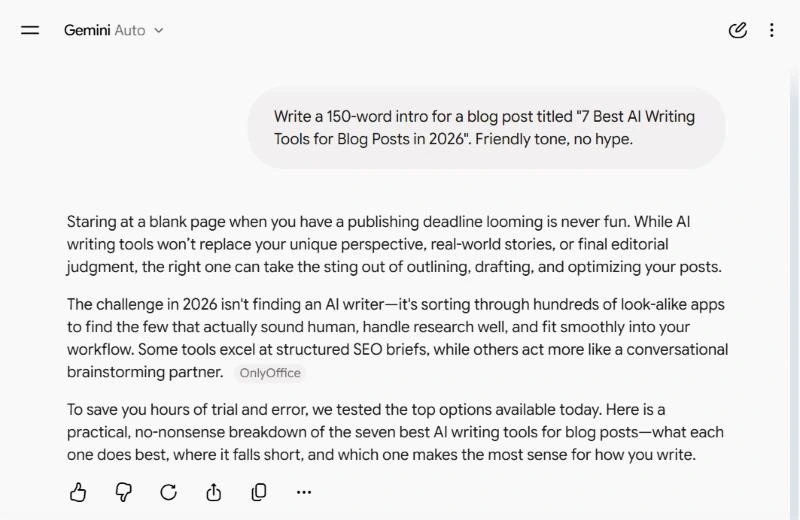
One honest limit of this test: the screen showed “Gemini Auto”, but we did not confirm on screen that the account was on the free plan. Treat it as a look at Gemini’s default writing, not as proof of what the free plan does.
Quick Stat: Gemini wrote 143 words for a 150-word request, with no limit message. In the same test, ChatGPT Free wrote 146 words and Claude Free wrote 157 (26 Nov 2026, word counts by hand).
The good: the intro was friendly, on topic and close to the length I asked for.
The problem: it added the sentence “we tested the top options available today”. Nobody had tested anything; Gemini made that up. It also attached a source chip that had nothing to do with the topic. If you publish AI drafts, remove claims like this before you hit publish, because a fake “we tested” line can hurt reader trust.
A second test on a confirmed free account is planned. If it runs, I will add the result here.
Gemini free vs Pro: what Google AI Plus and Pro add
The next question is what paying adds. Here is only what changes on Google’s paid plans, from the Gemini subscriptions page (US prices) and the Gemini Apps limits page, both checked 27 November 2026. I have not tested any paid Gemini plan.
| Plan | Price (US) | Usage vs free | Context window | Storage |
|---|---|---|---|---|
| Free | $0 | Standard limits | 32k tokens | 15 GB |
| Google AI Plus | $4.99/month | 2x | 128k tokens | 400 GB |
| Google AI Pro | $19.99/month | 4x | 1 million tokens | 5 TB |
| Google AI Ultra | from $99.99/month | 5x or 20x the Pro limits | 1 million tokens | from 20 TB |
My view: is the free plan enough, or should you pay? If you hit the free limit only now and then, wait for the 5-hour reset. If it stops you every week, Google AI Plus is the cheapest step up. If you are choosing between $20 plans, my Google AI Pro vs ChatGPT Plus comparison covers that decision in full.
The Gemini API is a separate product: developers get a free API tier “for developers and small projects”, and Google says content sent on that tier is used to improve its products (Gemini API pricing, checked 27 November 2026).
Is Gemini free good enough for bloggers?
For outlines and first drafts, yes. The free plan gives you the app, Canvas for editing longer text, and Deep Research for background reading. For a blog with a few posts a week, that is a lot for $0.
Watch the 32k context window. If you paste a long draft plus notes and ask for edits, the free plan holds far less of it at once than Pro. Split long posts into sections.
Check every fact it writes. In my test, Gemini invented a “we tested” claim. Always edit AI drafts before publishing, whichever tool you use. To compare Gemini with other writing tools, see the best AI writing tools for blog posts.
Compare with the other free plans: ChatGPT Free has no cap on everyday text chats (subject to abuse guardrails, per OpenAI), and Claude Free has a 5-hour and weekly limit like Gemini.
Is Gemini free? Questions people ask
Is Gemini free to use?
Yes, Gemini is free to use. Google lists the free plan at “$0/ month with a Google Account”. You get the Gemini app, image generation, Canvas, Audio Overviews and Deep Research, within standard usage limits (checked 27 November 2026).
Is there a daily prompt limit on Gemini free?
Google does not publish a number. The free plan has “standard limits” that depend on prompt complexity, features and chat length, and they refresh every 5 hours until you reach a weekly limit.
What is the difference between Gemini free and Google AI Pro?
Google AI Pro costs $19.99 a month in the US. It gives 4x the free usage, a 1 million-token context window instead of 32k, video generation and 5 TB of storage. Google AI Plus, at $4.99, gives 2x the usage and a 128k context window.
Does Gemini free include Deep Research?
Yes. Google’s limits page marks Deep Research for users without a plan, but warns it may be unavailable during periods of high demand.
When do Gemini free limits reset?
Every 5 hours, until you reach your weekly limit. When you hit the limit, Gemini tells you when it will refresh.
Why does Gemini free sometimes limit me sooner?
Two reasons from Google’s own pages. Long chats, files and heavy features like Deep Research use more of your limit. And when capacity changes, users without a Google AI plan may be limited before paying users. So you may hit the free limit sooner on busy days, even with short chats.
Sources
- Gemini Apps limits & feature availability (Gemini Apps Help), checked 27 November 2026
- Gemini subscriptions (US) (Google), checked 27 November 2026
- Gemini API pricing (Google AI Studio), checked 27 November 2026
- Our own blog-intro test in Gemini, 26 November 2026, 22:42 UTC+1 (free plan not confirmed on screen)
What to read next
Free gift: want the prompts and checklists I use to run this blog on free tools? Get the free Creator Playbook.